
Rescan Website in AiFaqChat
Quickly rescan your website to update the AI assistant with new content without waiting for the automatic periodic scan.
Step 1 — When to Rescan
Use rescanning when new pages, FAQs, or updates are added to your site and you want the AI assistant to reflect them immediately.
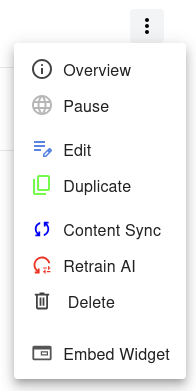
Step 2 — Select 'Content Sync'
In the Dashboard, locate the website you want to rescan. Click the menu next to it and select Content Sync
The system will scan your site for new content and partially retrain the AI assistant. Previous training data will be preserved, unlike full retraining — only the new or updated content is incorporated.