
Retrain AI Assistant in AiFaqChat
Use this feature to fully retrain your AI assistant with updated content.
Step 1 — When to Retrain
Retraining is recommended when you have added new content, updated your FAQ, or made significant changes to your website. This ensures your AI assistant responds accurately with the latest information.
Step 2 — Select 'Retrain AI'
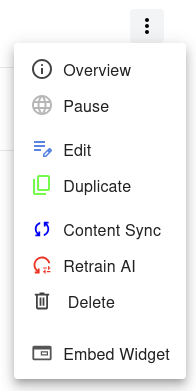
In the Dashboard, find the website you want to update. Click the menu next to it and select Retrain AI
Once retraining starts, all previous AI learning for this site will be overwritten. Make sure you have saved any important content before confirming.